
IMPORTANT: Only the account owner can add or update the Group NPI.
You can now add a Group NPI to your account for billing and insurance purposes. This feature helps ensure your invoices reflect the correct provider information when billing under a group.
How to Add a Group NPI
Go to Settings.
Navigate to the General Settings page.
Locate the Group NPI section.
Enter your Group NPI.
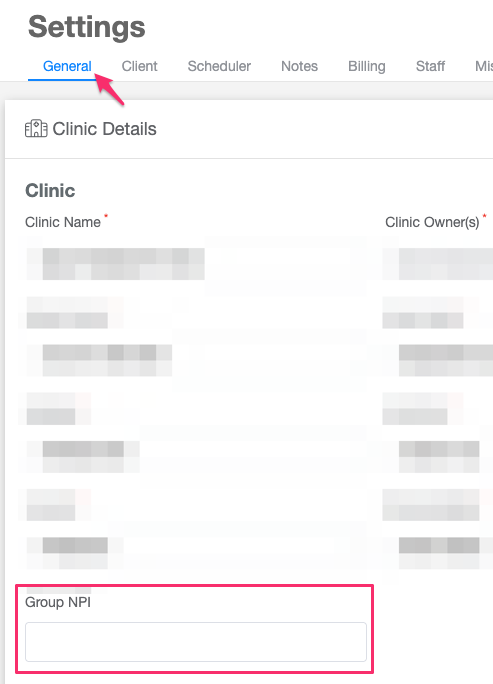
Click Save to apply the changes.
Control Whether the Group NPI Appears on Invoices
We’ve also added a new billing option that allows you to choose whether the Group NPI is displayed on your invoices.
To manage this setting:
Go to Settings.
Open the Billing tab.
Locate the option to toggle the Group NPI visibility on invoices.
Turn it on or off based on your preference.
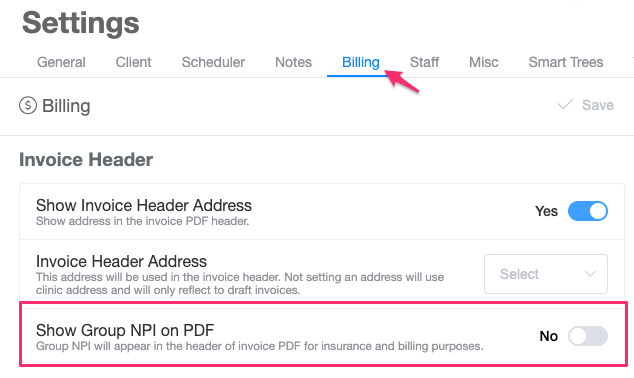
Click Save.
This gives you full control over how your billing information appears on client invoices.