
Note: This feature is available by request and is disabled by default.
The Multi-Currency feature allows your clinic to bill clients in different currencies. This is ideal for clinics that provide services internationally while keeping billing accurate for each region.
Enabling Multi-Currency
If you'd like to use multiple currencies in your clinic, please contact the Therabyte Support team. Once enabled, a new Multi-Currency setting will appear under Clinic Settings > Billing.
After enabling this setting, you'll be able to assign different currencies when creating:
- Services
- Programs
- Grants/Contracts
Supported Currencies
Therabyte currently supports the following currencies for Multi-Currency billing:
| Country | Currency |
|---|---|
| Australia | AUD ($) |
| Bermuda | BMD ($) |
| Canada | CAD ($) (Default for Canadian clinics) |
| Ireland | EUR (€) |
| United Kingdom | GBP (£) |
| New Zealand | NZD ($) |
| Philippines | PHP (₱) |
| United States | USD ($) (Default for US clinics) |
How It Works
By default, all new services use your clinic's default currency.
If Multi-Currency is enabled, you'll see a "Set a different currency" option when creating a new service.
- Create a new service.
- In the Service Fees section, check Set a different currency.
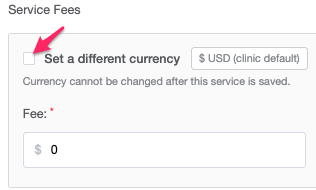
- Select the desired currency from the dropdown list.
- Save the service.
For example:
- Your clinic is based in Canada (CAD).
- You provide services to clients in the United Kingdom.
- You can create a service that bills in GBP (£) while your other services continue using CAD ($).
The selected currency will automatically be used throughout billing for that service, including invoices, payment dialogs, reports, and client-facing documents.
Important Limitations
Before enabling Multi-Currency, please keep the following in mind:
- Currency cannot be changed after saving
Once a service, program, or grant is created with a currency, that currency becomes permanently locked.
If you need to bill the same service in another currency, you'll need to create a new service using the desired currency. - Invoices cannot contain multiple currencies
An invoice can only contain items that use the same currency.
For example:
- ✅ GBP service + GBP service = Allowed
- ✅ CAD service + CAD service = Allowed
- ❌ CAD service + GBP service = Not allowed
Therabyte automatically filters available items and prevents mixed-currency invoices to ensure accurate billing.
- Existing services remain unchanged
Services that were created before Multi-Currency was enabled will continue using your clinic's default currency. These services remain fully functional and do not require any updates. - Payments
Invoices created in a non-default currency will display the correct currency symbol throughout the billing workflow, including:
- Invoice totals
- Payment dialog
- Refunds
- Client Portal
- Billing reports
- PDF invoices
This ensures clients always see the correct currency being charged.
- Payment Method Restrictions
For invoices that use a non-default currency:
- TB Pay (Stripe) is unavailable.
- Wallet payments are also intended to be unavailable for non-default currencies.
This helps prevent payment processing issues when currencies don't match the clinic's default billing configuration.
Frequently Asked Questions
- Can I change the currency of an existing service?
No. Once a service has been saved, its currency cannot be changed. - Can I have invoices with different currencies?
Yes. Your clinic can have invoices in different currencies, but each individual invoice can only contain items with the same currency. - Do I need to recreate my existing services?
No. Existing services will continue using your clinic's default currency. Only new services that you choose to create with a different currency will use another currency.
- Does this work with Programs and Grants?
Yes. Multi-Currency is also supported for Programs and Grants/Contracts, following the same rules as Services. Once a currency is selected and saved, it becomes locked. - Is Multi-Currency enabled automatically?
No. This feature is available by request. Contact Therabyte Support if you'd like to enable it for your clinic.