Related Articles:
How to Enable Invoice Signing
Only the clinic owner can enable or disable invoice signing.
To turn on invoice signing:
- Go to Clinic Settings
- Navigate to the Billing tab
- Enable “Invoice Signing”
- Save your changes
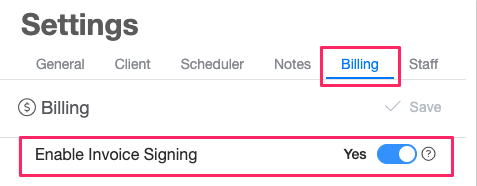
Once enabled, clients will be able to sign invoices from their Client Portal.
When Invoice Signing is Available for Clients
Clients will only see the signing option if:
- The clinic has enabled invoice signing in settings
- The practitioner shared the invoice with the client/guardian.
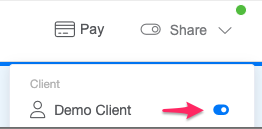
After Signing
- When you open an invoice, you'll see a number next to the Signatures section. This number indicates how many users have signed the invoice.
 Each user can only sign an invoice once. For example, if a client has two guardians and the invoice is shared with both of them, each guardian can provide their own signature. Once both guardians have signed, the signature count displayed on the invoice will show 2.
- Signed invoices will include client's signature details when exported as PDF.